
Template Literals in JavaScript

JavaScript Template Literals: A Complete Guide
JavaScript has evolved a lot, and one of the most useful features introduced in modern JavaScript (ES6) is template literals. If you’ve ever struggled with messy string concatenation, this feature will feel like a superpower.
In this blog, you will learn template literals from beginner to advanced level in a simple and clear way.
What Are Template Literals?
Template literals are a modern way to work with strings in JavaScript. They allow you to:
Insert variables directly inside strings
Write multi-line strings easily
Improve readability of your code
Instead of using quotes (' ' or " "), template literals use backticks ( ).
Problems with Traditional String Concatenation
Before template literals, we used + to combine strings.
Example:
let name = "Madhu";
let age = 20;

let message = "My name is " + name + " and I am " + age + " years old.";
console.log(message);
Issues:
Hard to read when strings get longer
Too many
+symbolsDifficult to maintain in large projects
Template Literal Syntax
Template literals use backticks and ${} for variables.
Basic Syntax:
let name = "Madhu";
let message = `Hello, ${name}!`;

console.log(message);
✔ Cleaner
✔ Easier to understand
✔ More modern
Embedding Variables in Strings
This feature is called string interpolation.
Example:
let product = "Laptop";
let price = 50000;

let result = `The price of \({product} is ₹\){price}.`;
console.log(result);
Visualization: String Interpolation
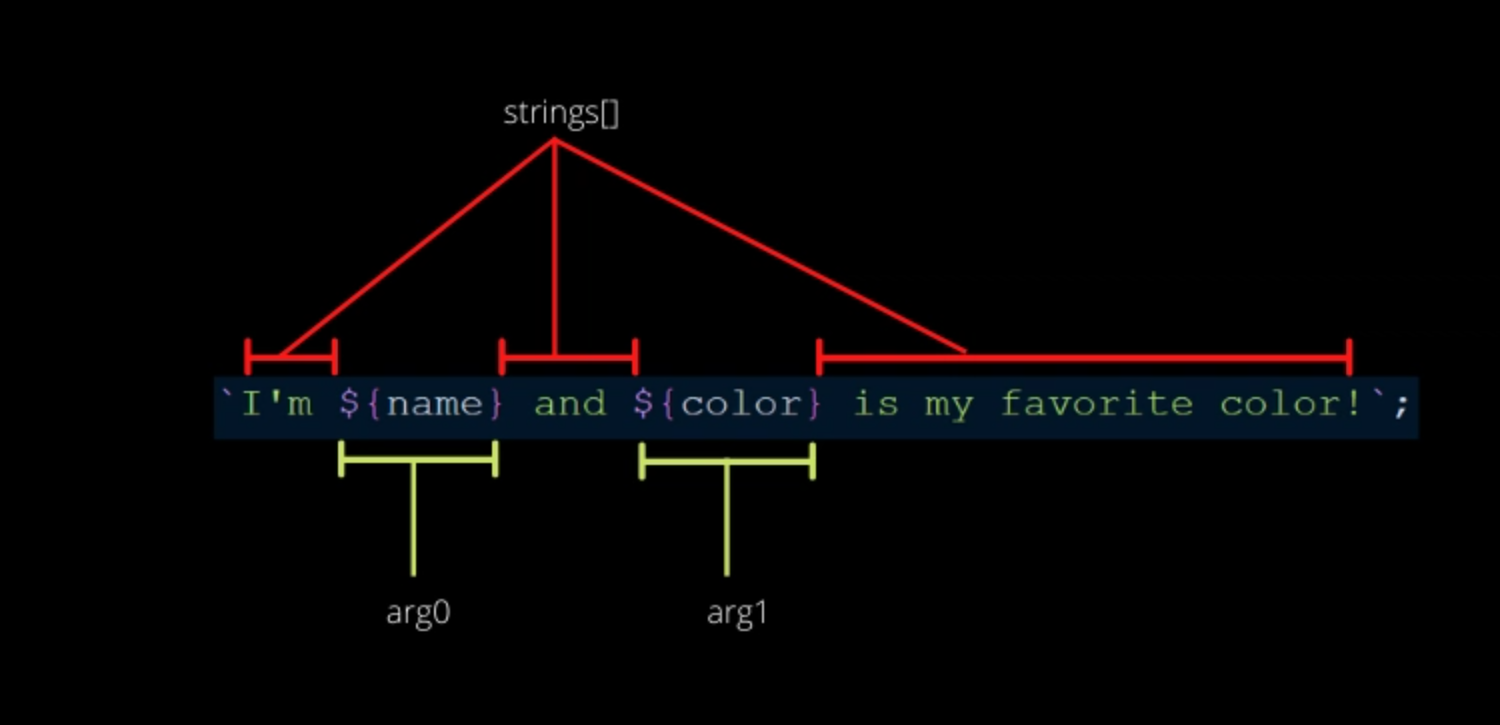
Here, variables are directly placed inside ${} which makes the string dynamic and readable.
Multi-line Strings
With old methods, multi-line strings were difficult.
Old Way:
let text = "This is line 1\n" +
           "This is line 2\n" +
           "This is line 3";
With Template Literals:
let text = `This is line 1
This is line 2
This is line 3`;

console.log(text);
✔ No \n needed
✔ Clean formatting
Before vs After: Code Comparison
Before:
let user = "Madhu";
let greeting = "Hello " + user + ", welcome to our website!";
After:
let user = "Madhu";
let greeting = `Hello ${user}, welcome to our website!`;
👉 Clearly, template literals improve readability.
Use Cases in Modern JavaScript
Template literals are widely used in real-world applications:
1. Dynamic HTML Content
let name = "Madhu"; let html = <h1>Welcome, ${name}</h1>; document.body.innerHTML = html;
2. API Data Display
let user = { name: "Madhu", age: 20 };console.log(Name: \({user.name}, Age: \){user.age});
3. Logging and Debugging
let score = 95; console.log(Your score is ${score});
4. SQL or Query Building (Carefully)let id = 10; let query = SELECT * FROM users WHERE id = ${id};
Why Template Literals Improve Readability
No messy
+operatorsVariables look natural inside strings
Easy to format long text
Cleaner code for teams and projects
👉 This is why modern JavaScript developers prefer template literals.
Advanced Tip
You can also use expressions inside ${}:
let a = 10;
let b = 20;

console.log(`Sum is ${a + b}`);
Conclusion
Template literals are one of the most powerful and simple features in modern JavaScript.
Key Takeaways:
Use backticks instead of quotes
Embed variables using
${}Easily create multi-line strings
Improve code readability and maintainability
Essential for modern web development
About the author
- I am currently pursuing a Bachelor of Technology in Computer Science and Engineering at Maharishi Markandeshwar (Deemed to be University), India. I have completed my Diploma in Computer Science & Engineering from Government Polytechnic, Purnea.
Comments
Join the discussionNo comments yet. Be the first to comment.